Dashboard
Current status, next steps, money summary and the latest photos, rebuilt from the records each day.
LiveClient portal · Built by Transparent Edge
iProject is a live project portal for builders and their clients. Drop in the plans, photos, quotes, invoices and documents you already have — the agent turns them into a programme, a budget, a materials list and a daily progress report. You approve what matters. You don't administer the system.
Live today on real projects in Auckland, Hamilton–Waikato and Greymouth.
You upload
The agent reads, prices, schedules
The principle
A builder or client opens an account and uploads what they already have: plans, photos, quotes, invoices, documents, voice notes. From those records the agent builds and maintains the materials list, the estimate, the schedule and the daily progress report. People approve what matters; they do not administer the system.
That is what you subscribe to. Everything in iProject is organised around it.
Inside the portal
A new account opens as a blank, structured project ready to fill. Nothing to configure, no tabs to build by hand — the agent fills them from your records.
Current status, next steps, money summary and the latest photos, rebuilt from the records each day.
LiveThe planned programme from a template, and actual dates taken from evidence — photos and site updates.
Planned dates in buildEstimate, quotes, actuals and payments, detailed excluding GST with GST stated at the top of the table.
LiveQuantities for the whole job from the consent plans, by trade, with the source sheet on every line.
In buildPlans, consents, reports, quotes and certificates, stored against the project and read by the agent.
LiveProgress photos captioned and tagged to schedule stages, with capture dates taken from the image.
LiveA client-ready daily progress report, written from the day's records and downloadable or emailed.
LiveDirect updates by text, voice or file from approved people and agents, kept with the project.
LiveTenders, bids and contracts. Contractors see only their own scope, contract and bid.
LiveAsk a question by text or voice and get an answer drawn from the records, inside your access level.
LiveWhat happens automatically
Each capability below is part of the product we are building towards. The badge tells you honestly whether it is live today or still in build.
Upload a building consent plan set and the agent runs a materials takeoff. Quantities land in the Materials tab by trade, with the source sheet and a confidence note on every line.
Materials and trades are priced from named, dated market sources. Anything without a source stays visibly unpriced — never guessed. The estimate is detailed excluding GST, with GST stated at the top.
The agent identifies the build type — single house, two-storey, terraces, renovation and additions, relocation — and loads the matching programme: stages, durations, dependencies and council inspections.
Every photo is analysed and captioned. Its content and capture date move the schedule forward — a slab pour marks the pour done and records the date — and appear in that day's report.
Each day the agent writes a client-ready report from that day's photos, updates, money items and documents. It sits in the Reports tab, ready to download or email.
Quotes and invoices become money items waiting for approval. Inspections and certificates attach to the schedule. Voice notes become updates. Every upload wakes the agent and gets read.
Clients, contractors and the builder ask by text or voice and get answers drawn from the records — within each person's access level, with money and GST answered under the same rules as the budget.
Approved people and agents post status by text, voice message or file. Status is rebuilt from the records plus those updates.
Takeoff and estimate figures are agent-prepared and presented for the builder's review. We make no accuracy claim on a job that has not been benchmarked.
Money, handled properly
Money is where portals usually go quiet. iProject states its rules up front and applies them the same way in the budget and in the Ask Agent.
Why you can trust the answers
iProject is built on the organizational singularity model — agents do the work, people stay above the loop, and every fact keeps its provenance.
Every quantity, price, date and caption is a record with its source, time and author.
Every change the agent makes — a date moved, a line priced, a stage closed — is logged with the evidence it used, so you can see why.
You approve money items, confirm flagged changes and can override any agent decision. Overrides are recorded, and the agent never overwrites them.
Intake, takeoff, pricing, scheduling and reporting run from the records — no admin input required.
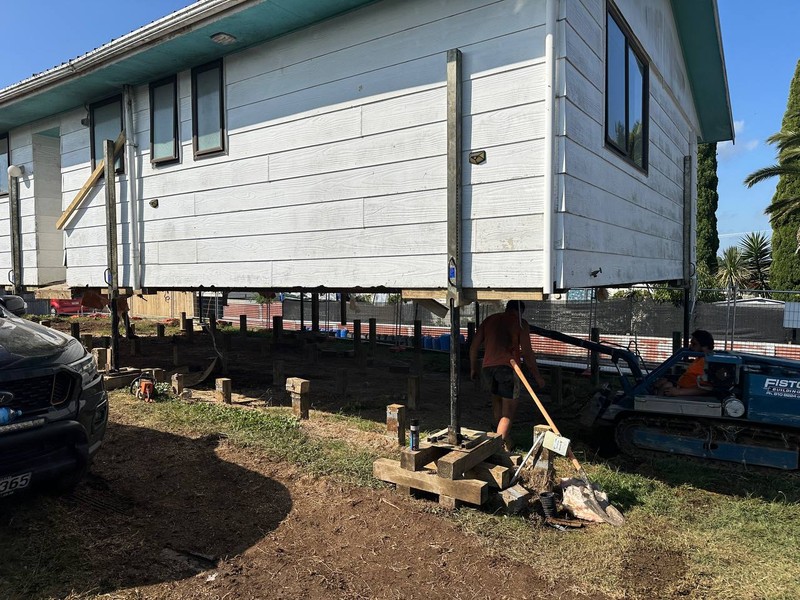
Run on a real job
The Market St portal is a working project: a 94 m² existing home and 67 m² of new work, moved, re-founded and extended. Its records are what the agent reads.
Market St is a renovation and relocation. A new-build programme template needs a second plan set — we will show that when it is running.
Ask your project anything
Every client has an assistant inside the portal. No digging through pages, no waiting for a callback.
“What's on the programme this week?”
“Where is the budget sitting, excluding GST?”
“Which variations were approved this month?”
“Show me the last report and this week's photos.”
Where we are
We sell iProject where we can stand behind it in person. Until the portal needs no admin input at all, every account comes with human support from Transparent Edge.
Now · supported in person
In-person demos, onboarding and human support from Transparent Edge.
Next · New Zealand-wide
When a fresh project can be built with nobody from Transparent Edge touching it, accounts open NZ-wide with remote support.
Later · Australia, then beyond
Takeoff rules, schedule templates, price sources and GST handling adapted for each market before launch.
See it on your own plans
Send us a note and we will show you the portal on a live project — the programme, the budget, the photos and the daily report — then talk about what it would take to run your job in it.